

What Is the WhatsApp Business API?
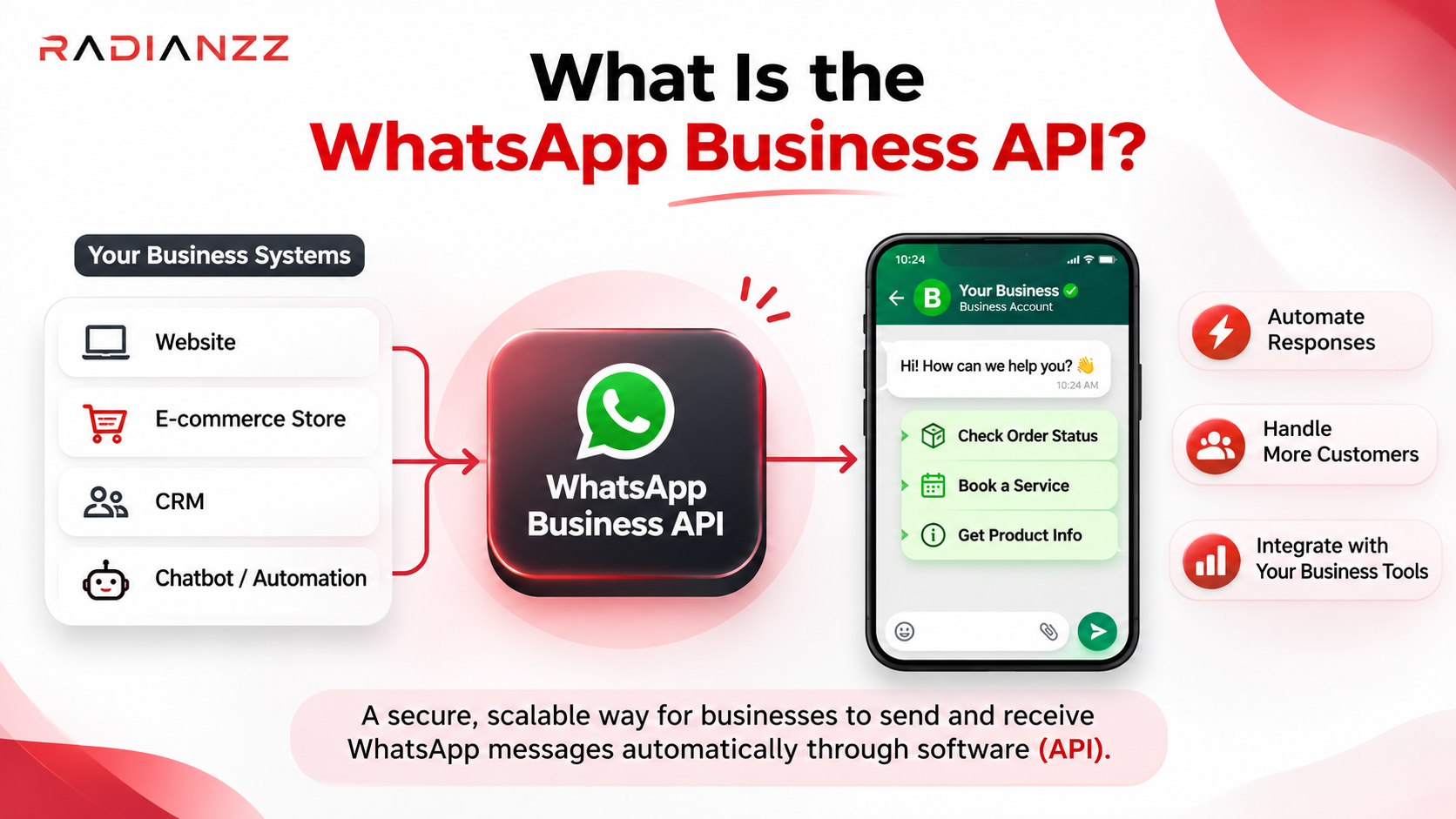
The WhatsApp Business API, which Meta now calls the WhatsApp Business Platform, is the version of WhatsApp that software talks to. There's no phone to pick up. Your website, CRM, online store or chatbot sends and receives messages through code, and your team usually answers from a shared inbox.
In one line: the WhatsApp Business API lets a company send and receive WhatsApp messages automatically, at scale, from connected software instead of a single phone.
You can connect to it directly through Meta's Cloud API, or through a provider that gives you a dashboard, inbox and chatbot builder on top. Most small and mid-sized businesses go the provider route unless they have developers in-house.
WhatsApp Business App vs WhatsApp Business API
Feature | WhatsApp Business App | WhatsApp Business API |
Built for | Owner-run teams replying by hand | Automation, many agents, system integrations |
Who can reply | One phone plus a few linked devices | Any number of agents through a shared inbox |
Automation | Greeting, away message, quick replies | Chatbots, workflows, messages triggered by your systems |
Campaigns | Basic broadcast lists | Approved templates, with sending limits that grow with your account quality |
Integrations | None | CRM, online store, payments, helpdesk, anything with an API |
Cost | Free | Meta's per-message charges, plus your provider's fee if you use one |
Can you keep using the app too?
Sometimes, yes. Meta rolled out a feature called coexistence through 2024 and 2025 that lets one number work on the Business app and the API at the same time, so you don't lose your phone chats. There are catches. The app and the API don't share billing or customer service window state, and your number has to be on the WhatsApp Business app, not regular WhatsApp. Moving a number from the app to the API without coexistence deletes the chat history on your phone, so ask your provider before you switch.
Why Automate WhatsApp in 2026?
Fair question. "Just reply faster" sounds cheaper. Here's what actually changes once you automate.
You answer at 11 pm without anyone being awake. A bot can confirm an order, share a tracking link or book a slot while your team sleeps. The customer gets a reply in seconds, and people rarely wait around for the business that answers last.
Nothing falls through the cracks. Every order gets a confirmation. Every abandoned cart gets one reminder. Every new lead gets a first reply, whether or not someone remembered.
Your team spends time where it counts. Automation handles the questions that have the same answer every time. People handle refunds, complaints, negotiations and anything that needs judgement.
Your data finally goes somewhere. When WhatsApp is connected to your CRM or store, a chat can create a lead, tag a customer or update an order. On a shared phone, it all just scrolls away.
It's a cost decision now, too. Meta's pricing rewards tidy setups: the right message category, replies that don't ramble, and conversations that start from Click-to-WhatsApp ads. Messy setups pay more. We get into the numbers below.
8 Things Worth Automating on WhatsApp
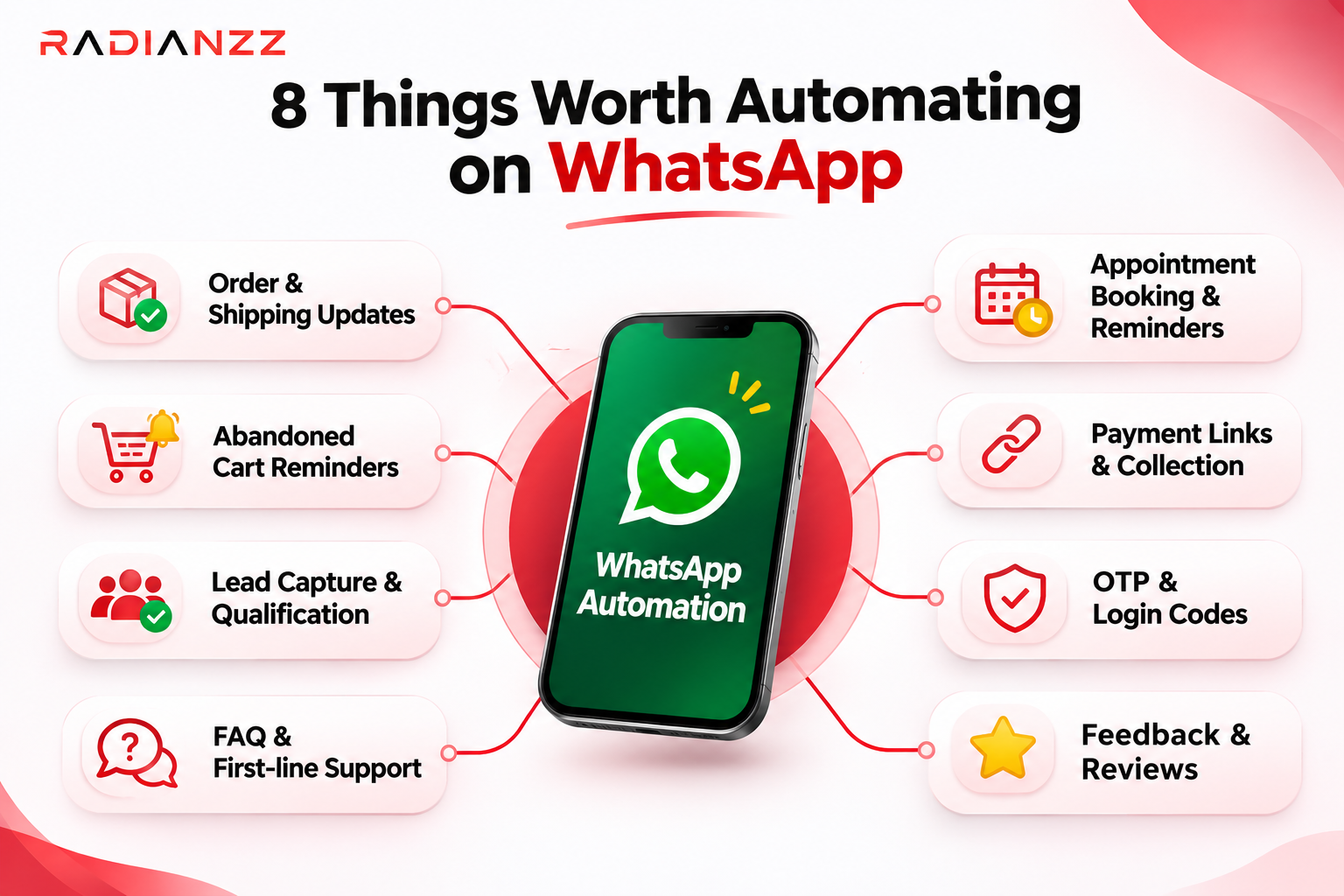
Not everything should be automated. These are the ones that tend to pay off. The message category is in brackets because it changes what you pay.
1. Order and shipping updates (utility). Confirmed, dispatched, out for delivery, delivered. These are the most-read messages a store sends, and the easiest to get right.
2. Abandoned cart reminders (marketing). One nudge a few hours later, with a link straight back to the cart. Marketing is the priciest category, so don't send three.
3. Lead capture and qualification. A chat that starts from a Click-to-WhatsApp ad, a website button or a QR code can ask for name, need and budget, then pass warm leads to sales.
4. FAQ and first-line support. Opening hours, return policy, tracking, pricing. Cover your top ten questions and always offer a way to reach a person.
5. Appointment booking and reminders. Clinics, salons, coaching classes, test drives. WhatsApp Flows let you build forms and menus inside the chat, so people can book without leaving it.
6. Payment links and collections. Invoice, payment link, due-date reminder. Meta introduced in-chat payments in India in 2023, with UPI apps and cards supported.
7. OTPs and login codes (authentication). Quick, familiar and cheap per message. Many businesses keep an SMS fallback for customers who aren't on WhatsApp.
8. Feedback and reviews. A message a few days after delivery asking how it went, with a link to leave a review.
Picture an online clothing store. An order is placed and a utility message confirms it. It ships and a tracking link goes out. It's delivered and a feedback request follows. A different customer leaves a cart behind and gets one reminder. Someone else replies "can I exchange the size?" and the bot collects the order number and new size before handing over to a person. That's five touchpoints, and nobody on the team typed any of them.
What WhatsApp Business API Automation Costs in 2026
You pay for two things: Meta's per-message charge, and your provider's platform fee if you use one. Meta's part has changed several times in the last fifteen months, so it's worth reading slowly.
How Meta charges
Since July 1, 2025, Meta bills per delivered message instead of per 24-hour conversation. Every business message sits in one category:
• Marketing: offers, promotions, cart reminders, win-back messages
• Utility: order updates, reminders, receipts
• Authentication: OTPs and login codes
• Service: free-form replies inside the 24-hour window that opens when a customer messages you
Messages your customers send you are never charged. The rate depends on the country code of the person you're messaging, and Meta only changes rates on the first day of a quarter.
What changed on October 1, 2026
Meta's developer documentation lists two things that were free and now aren't:
• Service messages. Free-form replies from a human agent or a third-party AI tool. They had been free since November 2024.
• Utility templates sent inside an open 24-hour window. Free since July 2025.
Service messages are priced at the same rate as utility and authentication messages in each country, and Meta doesn't offer volume discounts on them.
Meta also launched its own AI responder, Meta Business Agent, on July 1, 2026. Its replies are charged per token, at $2.00 per million tokens, which Meta says works out to roughly 4 to 5 cents per message.
Still free: messages your customers send you, and messages you send inside the 72-hour free entry window that opens when someone reaches you through a Click-to-WhatsApp ad or a Facebook page button and you reply within 24 hours. Meta Business Agent is the exception, since it still bills for tokens inside that window.
What it looks like in India
Message type | Typical use | Approx. rate per message (India) |
Marketing | Offers, cart reminders, win-back | ₹0.8631 |
Utility | Order updates, reminders | ₹0.115 |
Authentication | OTPs and login codes | ₹0.115 |
Service | Replies inside the 24-hour window | ₹0.115 (billable since Oct 1, 2026) |
These are the rates MyOperator published in October 2026. GST is added on top, your provider's fee is separate, and Meta can revise rates each quarter, so check the current rate card before you budget.
Take a support desk that sends 8,000 free-form replies a month. At ₹0.115 that's about ₹920 before GST. Nothing scary, but it grows with every chat, and it used to be zero.
Some providers also report a free monthly allowance of 1,000 service messages per phone number. Meta's pricing pages don't spell that out, so ask your provider before you plan around it.
Four ways to keep the bill sensible
1. Send one good reply, not four short ones. Every delivered message is now a charge.
2. Get the category right. You accept the charge for whichever category applies when a template is used, so check what Meta assigned before you launch.
3. Start ad-driven chats in the free window. If you run paid ads, Click-to-WhatsApp keeps the opening conversation free of Meta's delivery charges.
4. Watch the numbers. Meta's pricing analytics show how many messages you sent per category and what they cost. Look at them every month.
How to Set Up WhatsApp Business API Automation, Step by Step
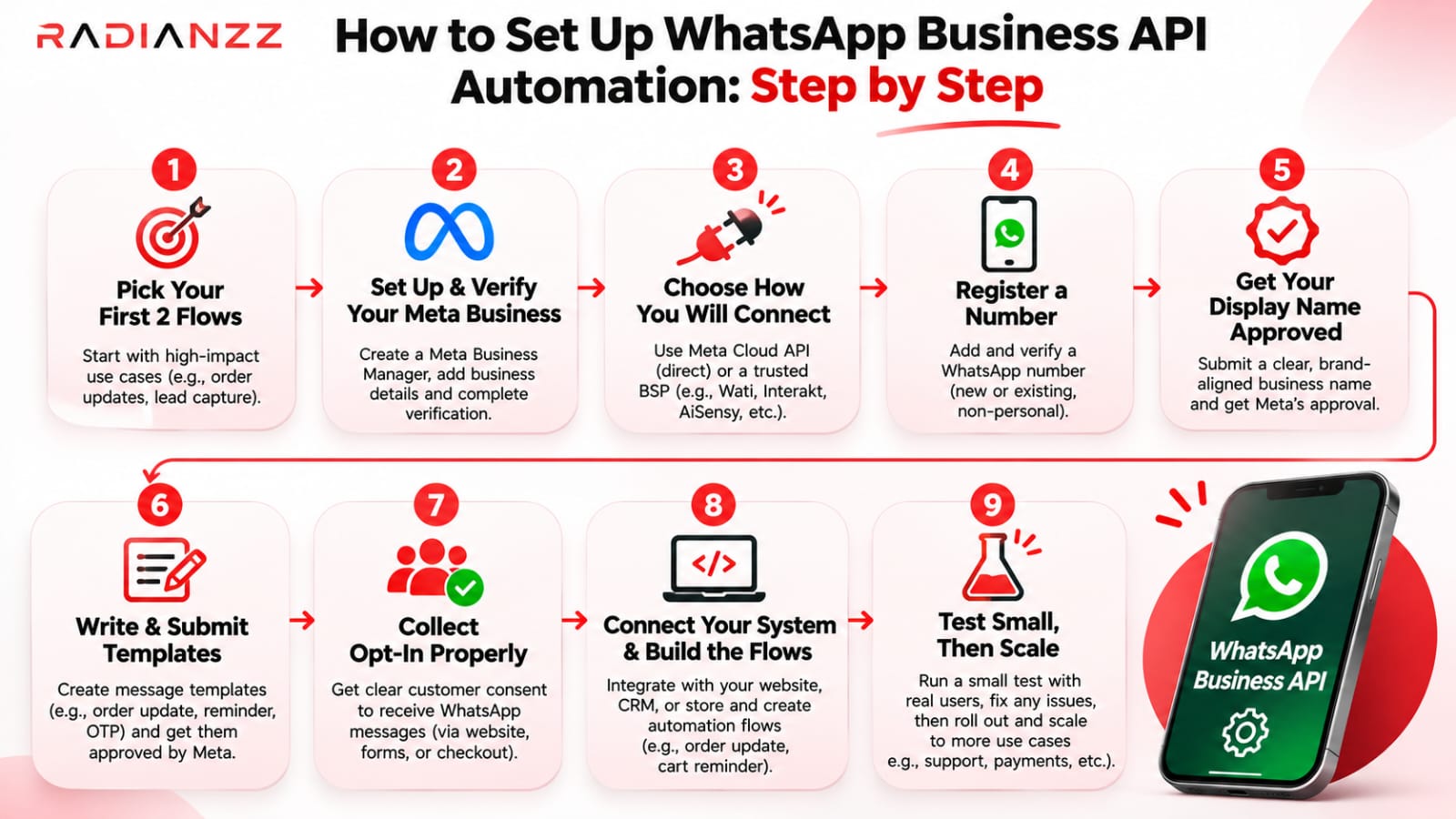
1. Pick your first two flows. Not twelve. Order updates plus FAQ replies is a sensible start. Add more once those run cleanly.
2. Set up and verify your Meta business portfolio. New portfolios start with a limit of 250 unique customers per 24 hours. Verifying your business is one route up to 2,000. After that Meta raises the limit automatically, to 10,000, then 100,000, then unlimited, as long as your message quality holds and you've used at least half your current limit over the last seven days. The limit is shared by every number in the portfolio, and it only applies to businesses starting chats. Customers who message you first don't count.
3. Choose how you'll connect. Go direct through Meta's Cloud API if you have developers. Use a provider if you want an inbox and chatbot builder out of the box. Ask any provider about setup fees, markup on Meta's rates and how you can export your data later.
4. Register a number. Use one that isn't active on a personal WhatsApp account. If it already lives on the WhatsApp Business app, ask about coexistence first so you keep your chat history.
5. Get your display name approved. It's what customers see, so use your real brand name.
6. Write and submit templates. Utility for transactions, marketing for promotions, authentication for codes. Templates are the only messages you can send outside the 24-hour window, and Meta has to approve them first.
7. Collect opt-in properly. Meta's policy requires opt-in before you message people, and they need to know what they're signing up for. A checkout tick box, a website form, a QR code or the customer messaging you first are all common routes. Put an easy opt-out in your templates.
8. Connect your systems and build the flows. Hook up webhooks so your store, CRM and helpdesk see every message. Add a human handoff to every flow.
9. Test small, then scale. Send to a small group first and watch your quality rating. Numbers that hit a poor quality threshold can be restricted, so warm a new number up gradually instead of blasting it on day one.
8 Common WhatsApp Automation Problems and How to Fix Them
Most automation projects don't fail because the idea was wrong. They stumble on the same handful of problems. Here's what we see most, and what fixes each one.
1. Templates keep getting rejected or recategorised
What's happening: You write a shipping update that also pushes a discount code. Meta will usually treat anything promotional as marketing, so the template is either rejected or approved as marketing and billed at the higher rate.
The fix: Give every template one job. Keep utility templates strictly about something the customer already did. Use clear variables instead of vague wording. And check the category Meta assigned before you go live, because you accept the charge for whichever category applies when the template is used.
2. Your quality rating drops and your limits shrink
What's happening: People block or report your messages. Repeated reports can lead to a low quality rating, lower limits, restrictions and eventually suspension.
The fix: Look at your opt-in first, since most blocks come from messages people didn't expect. Add a clear opt-out line, cap how often you message each person, split your list by interest and pause any template that's collecting negative feedback. You can see your rating in WhatsApp Manager.
3. You're stuck at 250 customers a day
What's happening: A new, unverified portfolio starts at 250 unique customers per 24 hours.
The fix: Verify your business. That opens the path to 2,000, and from there Meta scales you up automatically as long as your quality rating stays green or yellow. If you've verified and you're still stuck, raise a support ticket with Meta.
4. Messages fail because the 24-hour window closed
What's happening: Your bot tries to send a free-form message to someone who hasn't written in over 24 hours. It fails. 360dialog calls it one of the most common errors, even for experienced developers.
The fix: Build a fallback. If the window is closed, send an approved template instead, something like "We're still holding your appointment. Reply YES to continue." When they reply, the window opens again.
5. The bot loops, misreads people or traps them
What's happening: Someone types "I want a refund" and gets the main menu for the fourth time.
The fix: Offer a human at every step. Keep menus to three or four options. Hand over automatically after two failed attempts, and outside business hours say when someone will reply. Then read real chat logs every week. One more thing to know: since January 15, 2026, Meta bars general-purpose AI chatbots from the Business API. Bots built for support, bookings, orders and updates are fine. So point any AI at your own products and policies, not at "ask me anything."
6. Costs jump after October 1
What's happening: Replies inside open chats used to be free. Now each delivered one is billed.
The fix: Combine short replies into one complete message, route ad traffic through Click-to-WhatsApp, and review your category mix every month. Ask your provider for a per-category breakdown of what you've sent. The cost section above has the details.
7. Your CRM stops recognizing customers
What's happening: WhatsApp usernames let people hide their phone number. When someone does, their number may no longer appear in webhook payloads, and you get a business-scoped user ID (BSUID) instead. Meta began sending BSUIDs in webhooks in April 2026.
The fix: Store both the phone number and the BSUID on every contact, and match on the BSUID first. A BSUID can change, for example when someone gets a new number, so handle the update event and overwrite the old ID instead of creating a duplicate record.
8. Chats live in WhatsApp and nowhere else
What's happening: A lead says "send me a quote" and the conversation never reaches your CRM. Someone has to copy it over by hand, and sometimes nobody does.
The fix: Connect webhooks to your CRM, store and helpdesk so every conversation updates a customer record, tags the lead and triggers the next step. This is usually where having a developer on the project pays for itself.
Habits That Keep Your Automation Working
Once the basics run, a few habits separate setups that last from setups that get flagged.
• Write like a person. Use the customer's first name, short lines and plain words. All-caps promotions get blocked.
• Message at sensible hours. A "special offer" at 1 am is a quick route to a block. Use the customer's local time.
• Segment before you send. A message that matters to 20% of your list feels like spam to the other 80%.
• Keep a human within reach. The fastest way to lose trust is a bot with no way out.
• Change one thing at a time. If you rewrite a template and move the send time together, you won't know which one helped.
Numbers worth checking every week
Metric | Why it matters |
Delivery rate | A falling rate often points to bad numbers or a restricted account |
Reply and read rate | Shows whether the message was worth sending |
Block and report rate | Your early warning before the quality rating drops |
Quality rating | Green, yellow or red in WhatsApp Manager |
Handoff rate | How often the bot needs a person. If it's high, the flow needs work |
Cost per lead or sale | The number your finance team will actually care about |
How Radianzz Can Help You Automate WhatsApp
Reading about setup is one thing. Getting templates approved, systems connected and costs under control while you're busy running a business is another.
Radianzz is a technology and digital solutions company. We build websites, commerce platforms, custom software and growth systems, and WhatsApp automation sits right where those meet. Here's where we can take work off your plate.
Strategy and flow design
Before anything gets built, we map what's worth automating, which message category each flow falls into and roughly what it will cost to run. Some ideas don't deserve a bot, and we'll tell you which. This sits with our AI & Automation service.
Setup and integrations
We connect WhatsApp to the tools you already use: your Shopify or Shopify Plus store, WooCommerce, a custom app, your CRM or your helpdesk. When something needs custom plumbing, our API & Headless Systems and Custom Web Applications work covers webhooks, BSUID handling and human handoff.
AI chat flows that follow Meta's rules
We design assistants that stay focused on your products and policies, with a clear route to a person, so they sit on the right side of Meta's rules for AI on the platform.
Campaigns and lifecycle journeys
Abandoned cart, post-purchase, win-back. We plan WhatsApp messages alongside email and other channels through our Lifecycle & Email Marketing work, and use Performance Marketing to send ad traffic into Click-to-WhatsApp so conversations start in the free window.
Monitoring and ongoing support
Quality rating, template performance, message costs and BSUID changes all need regular attention. Our Maintenance & Support team can keep an eye on them, so surprises show up in a report instead of an invoice.
Whether you run a Shopify brand, a service business or a growing startup, we start with a conversation about what you actually want to automate, then work backwards. You can see our services, browse our case studies or talk to our team.
Conclusion
WhatsApp automation in 2026 isn't hard, but it's less forgiving than it used to be. Meta now charges for nearly every message it delivers. It watches quality closely, it limits what AI bots can do, and it's changing how customers are identified.
The businesses that do well with it aren't the ones that send the most. They pick a few flows worth having, get the categories right, ask permission before messaging and keep a person within reach.
Start small. Automate order updates and your top ten questions first. Watch the quality rating and the bill for a month. Then add the next flow.
And if you'd rather not work out templates, webhooks and BSUIDs on your own, that's what we're here for. Talk to the Radianzz team and we'll help you build something that works for your customers and your budget.